Many businesses are in a familiar place with their mobile app. The app works. Users can log in. Core features still run. From the outside, nothing feels broken, as a result, modernization keeps getting pushed to later.
This is a very human decision. In every business, leaders focus on what feels urgent today, so bugs are fixed and small updates go out almost instantly. The app continues to support the business, as it feels safe to leave things as they are.
But over time, though, small frictions start to appear with pages loading a little slower on newer devices. Simple changes take more effort than they used to. Eventually, mobile app integrations feel harder, as teams hesitate before touching core parts of the app. Ultimately, none of this looks like a crisis but just feels uncomfortable.
This is where hidden costs begin to build.
When modernization is delayed, the impact is rarely obvious at first since the app does not fail overnight. However, it slowly limits growth, and what looks like stability can quietly turn into constraint.
This blog explores those hidden costs and why timing matters more than most teams expect.
What is Mobile App Modernization?
Mobile app modernization is a strategic process of upgrading an existing mobile application in terms of its performance, UI/UX, security, and all other aspects so it works better with today’s business needs.
It is not just a visual update
It strengthens what runs behind the scenes
App or software modernization essentially improves the app’s architecture, performance, security, and stability, all of which help the app handle new operating systems and usage patterns without friction. It also makes integrations with other systems easier and more reliable.
It prepares the app for today’s platforms
Most importantly, modernization is rarely an all-or-nothing effort but is often incremental and ultimately guided by clear business goals.
Why Businesses Delay Modernization
Many business apps do not break in obvious ways. In a general sense, they keep running, users can still complete tasks, and even revenue still flows. When it is seen from a leadership view, the app feels dependable, which creates a sense of comfort.
Short-term stability often hides slow erosion because performance can slip a little with every OS update and small fixes take more effort than before. Eventually, teams start avoiding deeper changes because the system feels fragile. The app works in practice, but it no longer works well.
Another reason for delay in application modernization is fear of disruption. Leaders worry about downtime, user pushback, or internal resistance. When an app supports daily operations, then even small risks feel big, and doing nothing feels safer than changing something that appears stable.
Legacy workflows also play a role. Teams build habits around old systems. Reports, approvals, and handoffs depend on how the app behaves today. Modernization feels like it might disturb that balance.
In many cases, no single person owns the app’s future. Without clear ownership, decisions get postponed. The impact of delay stays invisible until it starts limiting growth.
Key patterns behind modernization delays
- The app works, but feels harder to change
- Stability today hides risk tomorrow
- Teams depend on legacy workflows
- Fear of disruption slows decisions
- No clear owner for long-term direction
The Hidden Costs of Delaying Mobile App Modernization
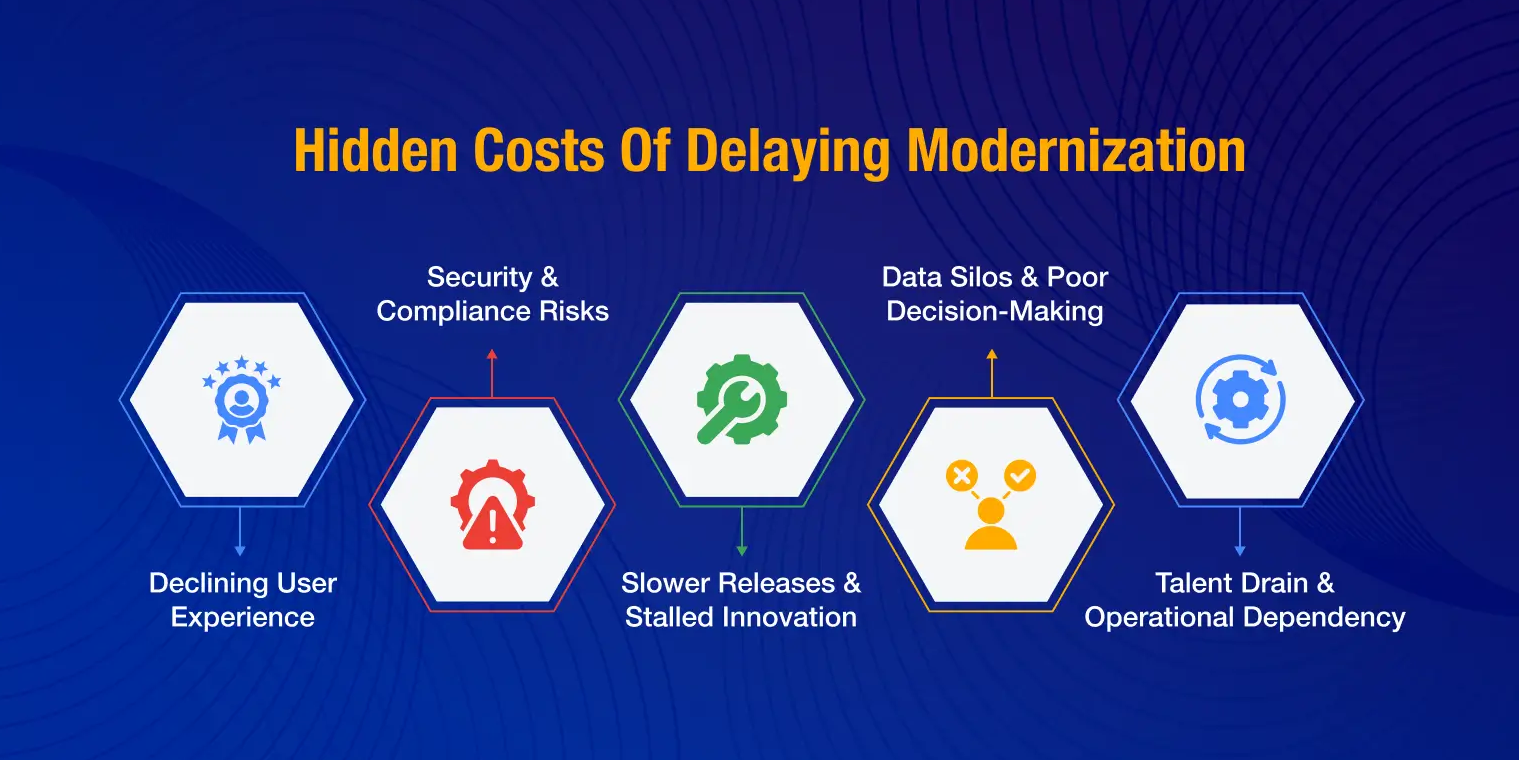
Delaying app modernization can hinder business growth in a multitude of ways, and there’s always a possibility that the competitors can make use of these missed opportunities.
Hidden Cost #1: Declining User Experience and Silent Customer Churn
User experience rarely breaks all at once. It fades slowly. Most businesses do not notice it happening because the app still opens and core actions still work. From a user’s point of view, though, the experience starts to feel heavier with time. That is when the quiet churn begins.
- Longer screen load times
- Lag during simple actions
- Delays after updates
- Reduced sense of responsiveness
Inconsistent behavior across operating systems
Mobile platforms change frequently. Legacy apps struggle to keep pace. Features behave differently across OS versions. Bugs appear only for certain users. The experience feels unpredictable, which reduces trust over time.
- Features working on some devices only
- Bugs after OS upgrades
- Layout issues across screens
- Higher support complaints
Outdated interaction patterns
User habits evolve quickly. Apps that rely on older interaction styles feel harder to use. Navigation feels less intuitive. Common actions take more steps. Users do not complain. They simply stop engaging as often.
- More steps for simple tasks
- Confusing navigation paths
- Lower feature discovery
- Reduced session duration
Accessibility gaps that limit reach
- Poor readability
- Limited support for assistive tools
- Inconsistent touch targets
- Accessibility feedback ignored
Hidden Cost #2: Security Exposure and Compliance Vulnerabilities
Security issues rarely announce themselves early. In older mobile apps, risk builds quietly in the background. Everything feels normal until a serious issue appears. By then, the impact feels sudden and hard to contain. This is why delayed modernization often turns security into a business risk, not just a technical one.
Older apps rely on tools and frameworks that stop getting regular updates over time. As new threats emerge, these older foundations stay exposed. The app continues to run, but protection weakens silently. This creates gaps that attackers look for. This is where legacy system modernization pays off.
- Fewer security updates over time
- Known issues left unresolved
- Limited support from vendors
- Growing dependency on workarounds
Higher risk of data leaks and misuse
- Weak control over data access
- Limited visibility into data flow
- Inconsistent data handling rules
- Rising exposure during integrations
Difficulty keeping up with compliance expectations
- Gaps in data protection practices
- Manual compliance checks
- Increased audit pressure
- Last-minute fixes before reviews
Security becomes reactive instead of planned
- Emergency fixes after incidents
- Limited long-term planning
- Higher operational stress
- Reduced trust in the system
Hidden Cost #3: Slower Feature Delivery and Innovation Bottlenecks
As markets move faster, the ability to release new features becomes a competitive advantage. Legacy mobile apps struggle here. The app may still support daily operations, but every change takes more effort than it should. Over time, speed slows down across the product and business.
Small changes start taking too long
In older apps, simple updates often touch many parts of the system. A small feature request can turn into weeks of work. Teams spend more time understanding side effects than building value, which slows momentum and frustrates both teams and stakeholders.
- Simple updates feel complex
- Longer approval cycles
- Frequent delays in releases
- Growing backlog of requests
Fear of breaking what already works
- High caution around core features
- Limited testing confidence
- More rollback discussions
- Conservative release decisions
Product roadmaps shrink over time
- Roadmaps focused on fixes
- Fewer user-facing improvements
- Deferred innovation initiatives
- Reduced experimentation
Competitors move faster with modern systems
While legacy apps struggle to evolve, competitors build and ship faster. They respond to market signals quickly. Over time, the gap widens. What started as a technical delay becomes a market disadvantage.
- Faster competitor releases
- Missed market opportunities
- Slower response to feedback
- Reduced differentiation
Hidden Cost #4: Data Silos and Poor Decision-Making
Data is meant to guide decisions. In legacy mobile apps, data often does the opposite. It exists, but it stays scattered and slow to access. Leaders feel informed, yet something always feels missing. Decisions take longer and confidence stays low. However, with robust data analytics, you can do away with data silos and harness it for your business growth.
- Delayed usage reports
- No live performance view
- Decisions based on old data
- Slower response to changes
Data trapped inside the app
Legacy apps were not built to share data easily. Connecting them with reporting tools or business systems feels difficult. As a result, data stays locked in silos. Teams work with fragments instead of a full picture.
- Manual data exports
- Limited system integrations
- Duplicate data across tools
- Inconsistent numbers in reports
Leaders operate with partial clarity
When data is incomplete, decisions rely more on instinct than insight. Leaders spend time questioning numbers instead of acting on them. Confidence drops, especially during high-stakes decisions.
- Conflicting dashboards
- Longer decision cycles
- Frequent follow-up questions
- Reduced trust in metrics
Personalization becomes hard to scale
Modern user experiences rely on data signals. Legacy apps struggle to support this. Personalization stays basic or static. Users feel unseen, even when data exists.
- Generic user experiences
- Limited segmentation
- Low engagement growth
- Missed personalization opportunities
Hidden Cost #5: Talent Drain and Operational Dependency
With dependence in legacy mobile apps, over time, the app starts relying more on specific individuals than on clear systems, which rarely shows up in reports, but leaders feel it when progress slows or when key people are unavailable.
Fewer developers want to work on older systems
Modern developers prefer tools that help them move fast and learn. Older apps often feel limiting. Work becomes more about fixing and less about building. Over time, motivation drops and hiring becomes harder.
- Low interest from new candidates
- Longer hiring cycles
- Reduced team enthusiasm
- Higher learning fatigue
Critical knowledge sits with a few people
Legacy apps often lack clear documentation. Decisions made years ago live only in people’s heads. A small group becomes the safety net. This creates pressure on them and risk for the business.
- Dependence on specific individuals
- Limited documentation
- Slower onboarding
- Knowledge gaps across teams
- Longer time for routine tasks
- Frequent context switching
- More manual checks
- Lower delivery confidence
Business risk increases when people leave
- Release delays after exits
- Increased error rates
- Higher stress during transitions
- Reduced predictability
Modernization reduces this dependency. It spreads knowledge, improves confidence, and makes delivery more reliable for everyone involved.
FAQ
Legacy apps often carry hidden risks that grow over time.
- Slower performance on newer devices
- Higher security exposure
- Difficulty scaling with growth
- Declining user experience
These issues build quietly and surface when the business needs speed and stability.
Modernization makes it easier to update, improve, and connect the app with other systems. Teams move faster. Decisions turn into action with less friction. The business responds better to change.
Yes. Many apps are modernized in steps. Teams improve parts of the app over time while core features keep running. This reduces disruption and keeps risk controlled.
Modern apps feel faster and more reliable. Users face fewer issues and enjoy smoother experiences.
- Better performance
- More consistent behavior
- Easier navigation
- Higher engagement
This leads to stronger user trust and repeat usage.
Yes. Smaller teams benefit from efficiency. Modern apps reduce friction, support growth, and prevent future bottlenecks. They help businesses compete more confidently.
Modernization prepares the app to work with data-driven features. It makes integrations easier and future upgrades smoother. This allows businesses to adopt new capabilities when the time is right.
- Slower updates
- Performance issues
- Rising security concerns
- Limited data visibility
These signs suggest the app may be holding the business back.

Continue reading the blog
with a Tech.us subscription
You’re now subscribed!