By now, most organizations aren’t debating whether artificial intelligence in business belongs in their operations. That conversation has largely moved on. The real question businesses are asking in 2026 is far more practical.
What business processes benefit most from AI automation?
The highly repetitive and data-heavy workflows that require consistent accuracy are the major business processes that benefit most from AI automation. Common examples include invoice processing, inventory management, customer support ticketing, employee onboarding, and data analysis. By automating these tasks, you can significantly improve efficiency and essentially allow your teams to focus on higher-value work.
Where does AI actually make sense inside a business?
AI is powerful, but it isn’t a magic layer you sprinkle across every department. Some processes benefit tremendously from automation. Others still rely heavily on human judgment, creativity, or relationship management.
The businesses seeing real results from AI tend to approach it differently. Instead of trying to automate everything, they start by identifying the processes that create the most operational friction. These are usually tasks that are repetitive, data-heavy, and prone to small but costly mistakes.
Think about the everyday work that quietly consumes hours of your team’s time, such as entering data, checking documents, organizing requests, or compiling reports. Individually these tasks seem manageable.
But when multiplied across hundreds or thousands of transactions, they become significant operational bottlenecks.
That’s where AI automation starts to shine.
In this article, we’ll explore five business processes that are particularly well suited for AI automation in 2026. For each one, we’ll walk through:
- the real-world scenario businesses face
- the operational pain points involved
- how AI automation changes the process
- the measurable business impact organizations typically see
If you’re considering where AI fits into your operations, these areas are often the most practical place to begin.
Top 5 Business Processes Ripe for AI Automation
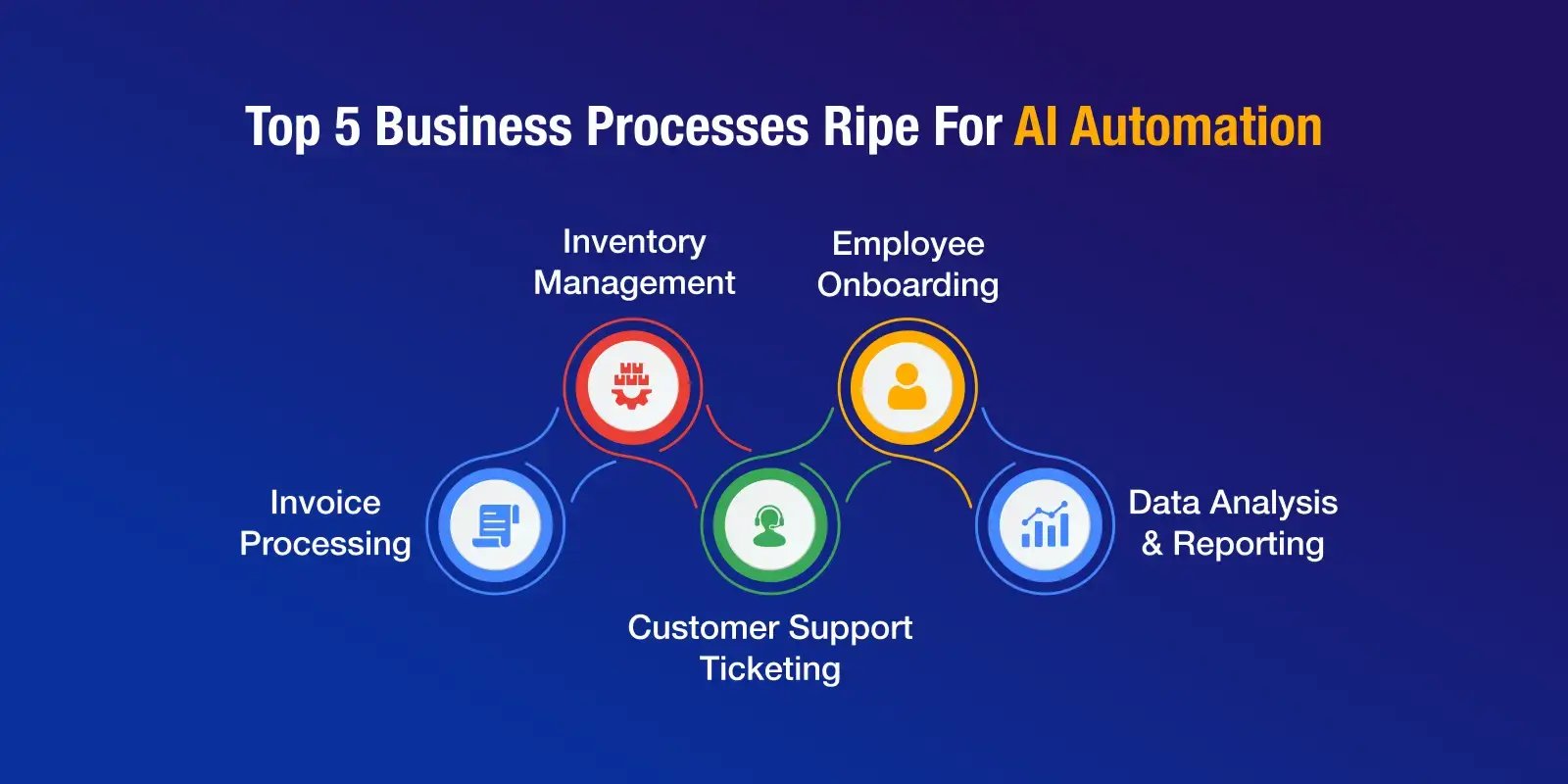
Here are the key business processes that you can easily automate using artificial intelligence development service:
- Invoice Processing
- Inventory Management
- Customer Support Ticketing
- Employee Onboarding
- Data Analysis and Reporting
Let’s look at them one by one.
1. Invoice Processing
Let’s start with a process almost every company deals with: accounts payable.
In many organizations, invoice processing still follows a familiar routine. A vendor sends an invoice. Someone on the finance team checks it against the purchase order, verifies the details, and manually enters the information into the accounting system.
It sounds straightforward. But once a business starts handling hundreds, or even thousands, of invoices every month, the workload quickly adds up.
Accounts payable teams often spend hours reviewing documents, confirming amounts, correcting formatting issues, and updating financial records.
The process is essential, but it’s rarely the best use of skilled finance professionals’ time.
Challenges in Traditional Invoice Processing
Several issues tend to surface as invoice volumes increase.
Time-consuming workflows
Even a small manual step repeated hundreds of times becomes a major time investment. Finance teams frequently spend entire days processing invoices rather than focusing on financial planning or analysis.
Human error
Manual data entry inevitably leads to mistakes, misplaced decimals, incorrect vendor details, or duplicate entries. These errors can delay payments or complicate financial reporting.
As businesses grow, invoice volume grows with them. Without automation, the only solution often seems to be hiring more staff just to keep up with paperwork.
How AI Automation Helps
AI-powered invoice processing systems dramatically simplify this workflow.
Using technologies like optical character recognition (OCR) and machine learning, AI can read invoices, extract key information, and match the data against purchase orders automatically.
Instead of someone manually typing invoice details into a financial system, the AI system performs the extraction and validation in seconds, the process is usually called intelligent document processing.
Many modern platforms can also flag discrepancies, such as mismatched amounts or duplicate invoices, before they cause accounting problems.
Business Impact
The difference can be substantial.
What once required hours of manual review can often be completed in minutes.
AI systems reduce data entry errors, which means fewer payment disputes and cleaner financial records.
As invoice volumes grow, businesses don’t necessarily need to expand their accounts payable teams. The system simply handles more transactions.
For finance departments trying to balance efficiency with accuracy, invoice automation is often one of the earliest and most successful uses of AI.
Key takeaway
Automating invoice processing reduces manual data entry and allows finance teams to focus on financial analysis rather than document handling.
2. Inventory Management
Inventory management is another area where many businesses still rely on manual processes or basic spreadsheets.
Warehouse managers track stock levels, reorder products, and try to ensure items are available when customers need them.
But inventory decisions rarely depend on just one variable. Demand changes, supplier timelines shift, and seasonal trends influence purchasing patterns.
When inventory decisions rely on incomplete or outdated data, businesses often face two familiar problems: overstocking or stockouts.
Both carry financial consequences.
Challenges Involved
Three common issues make inventory management particularly challenging.
Stock information is often scattered across warehouse systems, spreadsheets, supplier records, and point-of-sale tools. Getting a reliable, real-time view of inventory becomes difficult.
Without predictive insights, businesses frequently guess future demand based on historical trends or intuition.
Employees spend hours recording stock movements or updating spreadsheets rather than improving operations.
How AI Automation Helps
AI systems can bring inventory data together into a unified environment.
By analyzing historical sales patterns, seasonal fluctuations, and supplier timelines, machine learning models can forecast demand with far greater accuracy than manual methods.
AI platforms can also monitor inventory levels continuously and trigger automatic reordering when stock drops below defined thresholds.
Instead of reacting to shortages after they occur, businesses can anticipate demand before it happens.
Business Impact
The operational improvements are often significant.
Businesses maintain optimal inventory levels, reducing both stockouts and excess inventory.
Automated tracking eliminates the need for constant manual updates.
Lower operational costs
Companies spend less on storage and avoid tying up capital in unnecessary inventory.
For companies managing large product catalogs or multiple warehouses, AI-driven inventory management can quickly become a competitive advantage.
Key takeaway
AI-driven inventory systems help businesses maintain optimal stock levels by predicting demand and automating replenishment.
3. Customer Support Ticketing
Customer support teams often operate under constant pressure. As businesses grow, the volume of support requests tends to grow with them.
Customers submit questions through email, chat, or support portals, and each request needs to be categorized, prioritized, and resolved.
Without automation, support agents spend a surprising amount of time just organizing incoming tickets before they can even begin solving problems.
Challenges in Traditional process
Customer support operations typically struggle with three issues.
Growing businesses often receive hundreds of customer inquiries every day.
Agents must read each message and determine where it should go, billing, technical support, or account management.
Different agents may provide slightly different answers to the same question, which can frustrate customers.
How AI Automation Helps
AI can dramatically streamline ticket management.
Natural language processing allows AI systems to analyze incoming messages, categorize them automatically, and assign them to the appropriate team.
In addition, AI chatbots can resolve many routine questions instantly, things like password resets, order status inquiries, or account updates.
Instead of replacing support teams, AI removes repetitive requests so agents can focus on more complex issues.
Business Impact
The results are noticeable for both businesses and customers.
Tickets reach the right team immediately instead of waiting in a general queue.
AI systems provide standardized answers to frequently asked questions.
Scalable support operations
As customer bases grow, support teams can handle more requests without proportional increases in staff.
For organizations dealing with high support volumes, AI-assisted ticketing can significantly improve customer experience.
Key takeaway
AI improves customer support efficiency by automatically categorizing tickets and resolving common questions instantly.
4. Employee Onboarding
Hiring new employees is exciting for any organization. But onboarding those employees can be surprisingly complex.
HR teams must manage paperwork, coordinate training, set up accounts, and ensure that new hires understand company processes.
When onboarding is handled manually, small details often slip through the cracks.
Challenges that Employee Onboarding Face
Common onboarding challenges include:
HR teams spend significant time managing forms and updating systems.
Different employees may receive different onboarding experiences depending on who manages their process.
When HR teams focus on paperwork, they have less time to help new employees feel connected to the organization.
How AI Automation Helps
AI-powered onboarding systems automate many administrative steps.
New hires can complete documentation digitally, while AI tracks progress and reminds employees about pending tasks.
Some systems even offer conversational AI agents or assistants that answer common onboarding questions and guide employees through training materials.
Business Impact
The benefits extend beyond efficiency.
Employees complete documentation and training more quickly.
Every new hire receives the same structured introduction to the company.
HR professionals spend less time managing paperwork and more time focusing on employee engagement.
Key takeaway
AI onboarding tools streamline documentation and training, creating a consistent experience for new employees.
5. Data Analysis and Reporting
Modern businesses generate enormous volumes of data.
Sales transactions, marketing campaigns, customer behavior, and operational metrics all contribute to a growing pool of information.
The challenge isn’t collecting data, but it’s turning that data into useful insights.
Traditionally, analysts spend hours gathering information from different tools, cleaning the data, and preparing reports.
Challenges Involved
Several obstacles often slow down this process.
Business information lives across multiple platforms.
Analysts repeatedly perform the same data preparation tasks.
By the time reports are ready, the data may already be outdated.
How AI Automation Helps
AI-powered analytics platforms can integrate data from multiple systems automatically.
They can clean datasets, detect patterns, and generate visual reports without requiring manual preparation.
Some platforms also provide predictive insights, highlighting trends that might otherwise go unnoticed.
Business Impact
The result is a faster, more responsive decision-making environment.
Leaders gain immediate access to up-to-date performance data.
Automated data processing reduces inconsistencies.
Organizations can identify trends earlier and adjust strategies accordingly.
Key takeaway
AI accelerates decision-making by automatically aggregating and analyzing business data in real time.
Why Human Oversight Still Matters
While AI automation is powerful, it works best when paired with human expertise.
AI excels at handling repetitive tasks and processing large datasets. But strategic thinking, creativity, and complex decision-making still require human judgment. Hence, human in the loop (HITL) is highly crucial for any organizations that plan to automate its processes.
The most effective organizations treat AI as a collaborative tool, not a replacement for people.
By allowing AI to handle routine operational tasks, teams can focus on higher-level work—strategy, innovation, and relationship building.
Common Challenges when Implementing AI Automation
Even promising automation projects can encounter obstacles.
Data Quality
AI systems rely heavily on accurate data. Organizations must invest in strong data governance practices to ensure reliable inputs.
Change Management
Employees may initially worry that automation threatens their roles. Clear communication and training are essential to show how AI supports, not replaces, their work.
Model Maintenance
AI models must evolve alongside the business environment. Continuous monitoring and periodic updates help ensure systems remain accurate and relevant.
When Should a Business Start Using AI Automation?
Businesses should consider AI automation when certain operational signals begin to appear. These signals usually indicate that manual processes are limiting growth.
Common indicators include:
- Teams spending large amounts of time on repetitive administrative work
- Increasing error rates in manual data entry
- Growing operational workloads without proportional staff growth
- Delays in reporting or decision-making due to slow data analysis
- Customer support teams struggling to manage ticket volumes
When these patterns emerge, AI automation can help reduce operational friction and allow teams to focus on strategic work rather than routine tasks.
To Sum Up
AI automation is rapidly reshaping how businesses operate, but the key to success lies in applying it thoughtfully.
Processes like invoice processing, inventory management, customer support ticketing, employee onboarding, and data analysis share one common characteristic: they involve repetitive tasks that consume valuable human time.
By automating these workflows, businesses can reduce operational friction, improve accuracy, and scale their operations more efficiently.
Perhaps more importantly, automation allows teams to shift their attention toward strategic work that drives long-term growth.
Organizations that identify the right processes for AI, and implement it responsibly, will be far better positioned to compete in the increasingly data-driven landscape of 2026 and beyond.
FAQs
AI automation works best for processes that deal predominantly with repetitive, data-driven, and rule-based tasks. They typically involve:
- Invoice processing
- Support ticket categorization
- Inventory tracking
- Report generation
These are some business processes ripe for automation because they follow predictable steps and involve large volumes of data.
Most businesses start with processes that consume the most time but add the least strategic value. High-volume tasks are often the easiest and most impactful places to introduce AI automation . They include:
- Manual data entry
- Document verification
- Reporting
AI usually augments human work rather than replacing it. It handles tasks that don’t require human effort and strategic thinking, which allows employees to focus on problem-solving, customer relationships, and strategic decision-making.
The timeline for implementing AI automation highly varies, but many organizations begin seeing results within a few months for simpler processes. The biggest factor that affects speed is how organized and accessible the company’s data is.
Yes. AI automation helps smaller teams handle routine tasks more efficiently. Many businesses start with one or two processes and expand automation once they see measurable improvements.

Continue reading the blog
with a Tech.us subscription
You’re now subscribed!